
Cyber For Youth's 1st Workshop

Updated: Apr 30, 2025
Article written by: Nirvika Choudhury, Sahana Suresh, Loreen Lu, Natasha Gumpula, Jia Fletcher, and Puravi Abburi

On November 18th, the Cyber for Youth team hosted its first workshop at Monta Vista High School, where we engaged four hundred ninth graders in important conversations about online safety. The teen-led workshop was held all day long in 45-minute blocks. The workshop’s main focus was ensuring that students understand the implications of cyberbullying and digital footprints. Students participated in an interactive activity where they assessed a fictional character’s digital presence and devised strategies to improve it. This encouraged students to understand the long-term impact of their online actions and to think critically about their digital presence moving forward.
Ria Sethi, the founder of Cyber For Youth, was at the heart of ensuring the Monta Vista event ran smoothly. Her journey began with strong connections – Ria had worked with the principal before through the Social, Emotional, and Equity Coalition (SEEC). Through this connection, the Cyber For Youth team was able to present a pitch deck and an outline for the workshop to the principal, Mr. Ben Clausnitzer. Once Mr. Clausnitzer approved their pitch and included the workshop in the ninth-grade PE curriculum, they moved on to creating content for the event. The process involved several rounds of review and feedback to ensure that the material met the school’s standards and was tailored to the 9th graders’ interests.
Nirvika Choudhury, the head of the Research and Writing team, was instrumental in shaping the workshop’s content. She designed the digital footprint character scenario activity to provide students with an engaging way to reflect on their online choices.

“I wanted to provide students something that was both interactive and something that they could take away about digital footprints,” she explained. Nirvika wrote detailed character profiles, including posts, comments, and search histories. Her goal was to highlight how people from diverse backgrounds face online challenges, making the lesson relatable and impactful. Rafael Bañes, the head of marketing, transformed these profiles into visuals for the activity. “I had a lot of creative freedom with the number of likes, profile pictures, and creating the YouTube thumbnails,” he shared. These footprints required careful attention to detail to ensure every comment or each character’s interaction felt authentic.
When Mr. Clausnitzer requested the workshop to be shortened to 45 minutes from the original 90 minutes, Nirvika collaborated with Ria to revise the content and ensure that the core activities remained engaging and relevant. Next, planning shifted into high gear after the workshop date was finalized. “There were a lot of things that had to be done that we didn’t realize had to be done,” Ria said. This included printing materials, assigning roles, and managing roles for the presenters.
To discuss logistics and prepare for the workshop, the team held multiple meetings at Starbucks. “We had a lot of meetings as just the workshop team,” shared Samhita Srimath Kandali, one of the two heads of the Communications Team at Cyber for Youth. “But apart from that, we met with just the presenters.” She enjoyed practicing her presentation with other C4Y members before the workshop. “It felt like a mock version of what we’d be doing, and it helped us refine our presentations and get comfortable with the flow.” Besides the Starbucks meetings, Ria also conducted individual preparation meetings with each workshop member by having them share their presentation and giving them mock situations to respond to.
Natasha Gumpala and Loreen Lu, Research and Writing team members, passed out materials during the Monta Vista workshop and engaged in student discussions. Loreen found “being able to teach kids about the dangers online and how they should be aware online” and interacting with “Cyber For Youth [members] and being able to be friends with some of them,” a rewarding experience. Natasha appreciated the enthusiasm some students from Period 2 displayed when forming ideas and solutions during the digital footprint activity. When she went up to their table, they were excited to share how they would make a better profile for their given person; some of them mentioned apology videos, which was a creative and unique idea that stuck out to Natasha, as not many people had mentioned it before. Additionally, while presenting and discussing, she did her best to make sure the students were paying attention. “Keeping them engaged was really important,” Gumpula said. “If I were engaged, they would be, too,” she explained. Similarly, Vaishnavi Rajesh, a Communications team member, adjusted her approach to keep the students engaged and understood that "adapting and keeping [her] focus on helping them understand was key." By the end of the workshop, she was proud to see the kids stay involved and interested. "To keep the students engaged during my section, I used voice modulation and made sure to show enthusiasm," Vaishnavi explained. She felt that showing excitement about the topic kept the students more involved, and that made all the difference.
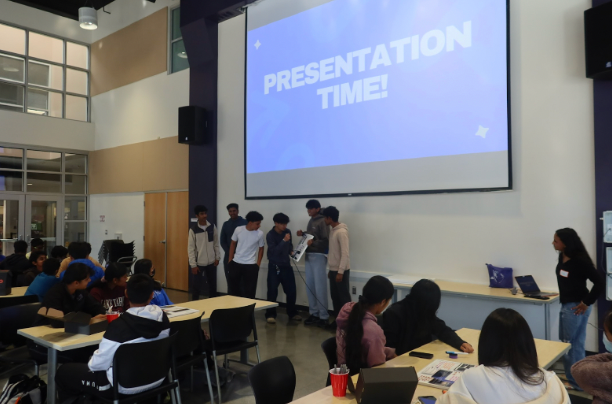
Freshmen presenting their boards and digital profiles to workshop attendees. Photo taken by Rafael Bañes.

This engaging approach left a lasting impression on MV freshmen Julia Pan and Ariel Yu. Ariel, when discussing the Digital Footprint Mystery Case Box activity, believed “it allowed her to take what we had been learning, all the data and info, and apply it to the real-life scenarios.” Julia shared her key takeaways from the workshop, saying, “I never knew that job employers would look at things like my posts, so now I'm extra cautious about my digital footprint.” The goal of educating students on this topic was to encourage students like Julia and Ariel to reflect on their online activity and make any necessary changes to improve their digital footprint. These experiences made the learning process more enjoyable and helped students practically understand the significance of online safety topics.


hi88 chia nội dung thành từng mục có tiêu đề riêng, kiểu này hợp với mình vì thường chỉ đọc lướt trên điện thoại. Gặp một đoạn chữ dài quá là mình dễ bỏ qua, còn có tên mục rõ ràng thì đỡ phải kéo lên kéo xuống tìm ý. Muốn biết trang giới thiệu gì thì nhìn qua các tiêu đề cũng hình dung được phần nào, không cần đọc liền một mạch. Mình thấy chỗ nói về đường vào chính thức và đường dự phòng cũng được nhắc rõ, chứ không chỉ nói chung chung là có nhiều cách truy cập. Mấy thông tin khác mình chưa kiểm chứng nên cũng không nhận xét thêm. Riêng phần giới…
keo nha cai thì mình mới ghé qua xem giao diện thôi, chưa ngồi đọc gì kỹ nên cũng không có nhiều chuyện để kể. Có cái mình thấy khá hợp mắt là nội dung được tách thành từng khối, lướt xuống không bị cảm giác chữ nối nhau mãi. Mình hay mở trang lúc rảnh được vài phút, nên kiểu trình bày nhìn qua đã phân biệt được từng phần như vậy khá tiện. Không cần màu mè quá, miễn đừng làm mình phải dừng lại đoán xem đang đọc tới đâu là ổn. Với lại mình cũng để ý menu một chút, vì đang xem mà muốn chuyển sang mục khác thì ngại nhất khoản tìm loanh quanh.…
xoso66 mình mới ghé xem sơ, chủ yếu đọc phần giới thiệu chứ chưa tìm hiểu sâu hơn. Mình thấy dễ theo dõi ở chỗ nội dung cho người mới được tách thành mục hỏi đáp riêng, có cả câu về việc đăng ký có cần xác minh ngay không. Những thắc mắc kiểu này thường là thứ mình muốn tìm trước, nên có tiêu đề ghi thẳng vấn đề thì đỡ phải đoán xem nên đọc ở đâu. Phần ưu đãi cũng nhắc đọc kèm thể lệ chứ không chỉ nói đến giá trị được quảng bá, điểm này mình thấy khá thực tế. Mình chưa dùng các tính năng nên cũng không nhận xét gì thêm. Riêng mục…
https://88vbet.gg/ mình thấy kiểu làm này giống mấy trang giải trí online mình từng lướt trước đó, nhưng cảm giác gọn gàng hơn nên đỡ bị ngợp ngay từ đầu. Vào trang là thấy chữ nghĩa rõ, tiêu đề tách bạch, kéo xuống một đoạn là bắt nhịp được họ đang nói gì mà không phải nheo mắt đọc từng dòng (mình khá dị ứng mấy web nhét chữ li ti). Mình chỉ xem nhanh phần nội dung giới thiệu thôi, thấy họ nhấn mạnh trải nghiệm dùng thuận tiện với giao diện dễ thao tác, và có khu FAQ đặt khá nổi, nhìn phát biết chỗ để hỏi đáp cho người mới. Menu để chỗ dễ thấy nên bấm…
sun win tối qua mình lướt trong lúc chờ cơm chín, tay thì bận cầm điện thoại mà vẫn kéo được mượt nên cũng đỡ bực. Mình không định tìm hiểu sâu đâu, chỉ xem họ trình bày có dễ nắm không, kiểu đọc lướt vài phút mà không bị “lạc trôi” giữa đống chữ. Trang chủ nhìn gọn gàng, các khối nội dung xếp thẳng xuống nên mắt cứ thế đi theo, không phải đoán xem nên bắt đầu ở đâu. Có đoạn “Giới thiệu tổng quan” đặt khá rõ, đọc qua là hiểu đại khái họ đang nói gì và muốn người mới nhìn vào theo hướng nào. Nhìn chung không màu mè, hơi nghiêm túc theo kiểu…